Photoshop Command Palette: Spotlight and Raycast Style
You already live in launcher apps: Spotlight on the Mac, Alfred workflows, or Raycast with extensions. You type a fragment, pick a hit, move on. A Photoshop command palette works the same way inside the document: one field, fuzzy intent, instant action, so nested menus stop stealing attention.
What a Photoshop Command Palette Is (and Is Not)
A command palette is not another panel you memorize. It is a search-first surface where the file stays open, the canvas stays in view, and results map to real Photoshop operations. Think "command palette" as a behavior: open, type, arrow keys, Enter. That is the same muscle memory as Spotlight-like search, just scoped to creative work instead of the whole OS.
Photoshop still expects you to know menu geography for many tasks. A palette pattern closes the gap between "I know what I want" and "I refuse to click four submenus to get there."
Spotlight, Alfred, Raycast: The Habit You Can Reuse
Spotlight trains you to hit a shortcut and trust partial text matches. Alfred and Raycast go further with actions and deep links. The common thread is low ceremony: recall by name, not by path.
Bring that habit into Photoshop and three things get easier:
- Menus: Jump to commands you use rarely, where shortcuts would clutter your brain.
- Actions and presets: Find a named action or tool preset when the pickers feel slow.
- Scripts and utilities: Run something technical without hunting the Scripts menu every time.
The goal is not to replace every shortcut. It is to give you a second line of defense when memory fails or when setup changes between clients and machines.
Command Search as Your In-App Command Palette
Configurator Reloaded 2 includes Command Search: type to filter matches from Photoshop menus, actions, brushes, tool presets, and tools, plus workflow scripts and Script Editor scripts. Run the highlighted row with Enter, or add it as a panel button when you want the command one click away next time. It is the closest practical fit to a Photoshop command palette if you want Raycast- or Alfred-style speed without leaving the app. Full behavior and access options are on the Command Search page.
Command Search in Configurator Reloaded 2 behaves like a focused launcher: type, select, run, without digging the menu bar.
Open It the Way You Open Spotlight
Treat the palette like Spotlight for Photoshop: bind a global shortcut so it opens from any tool state. A helper flow is described on the Command Search keyboard shortcut page. You can also open it from the magnifying glass on a panel footer or via Plugins → Configurator Reloaded 2 → CR2 Command Search.
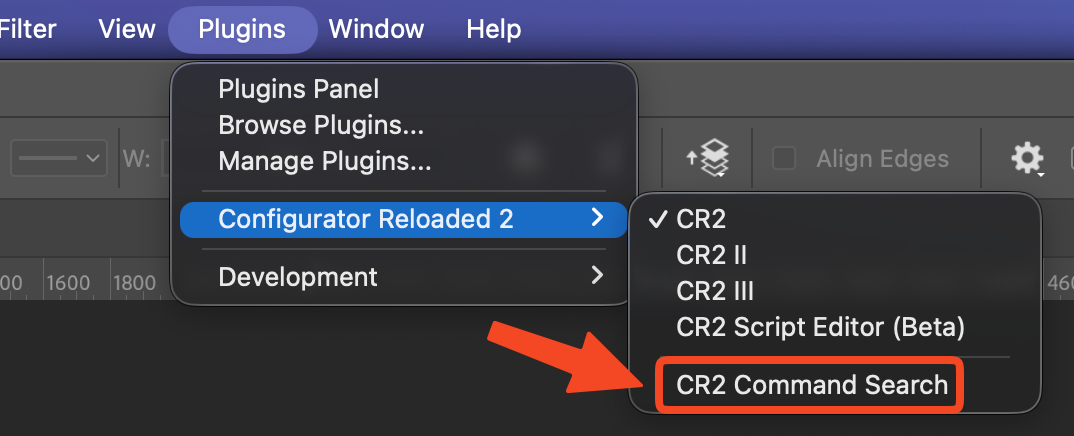
Menu path to open command-palette style search from the plugin when you prefer the menu bar.
If you want Spotlight or Raycast logic inside Photoshop, try Configurator Reloaded and wire Command Search into the same finger habits you already use on the desktop.