CEP vs UXP in Photoshop: Which Should You Use?
Picking between CEP and UXP in Photoshop is really a question of risk: keep older panels working now, or avoid bigger support headaches later. If you are comparing CEP vs UXP in Photoshop, the short version is simple: CEP can still be useful for legacy workflows, but UXP is the safer choice for new work, newer Macs, and long-term compatibility.
Adobe says CEP will remain in Photoshop for some time, but it will eventually be deprecated and removed, while UXP is the platform Adobe is actively pushing forward. That alone does not mean every CEP plugin is suddenly obsolete, but it does change how you should choose tools and plan migrations. Adobe explains the direction in UXP for CEP Developers.
What CEP Is Still Good For
CEP is Adobe's older panel platform for HTML, CSS, and JavaScript extensions inside Creative Cloud apps. Many established Photoshop panels still use it, which means CEP is often the platform behind tools studios already depend on every day.
That matters because "older" does not always mean "useless." CEP can still be the practical choice when:
- your team already relies on a stable CEP plugin
- the vendor still supports your Photoshop version and hardware
- you are not ready to budget for a migration yet
- you mainly care about keeping a proven workflow running
The tradeoff is that CEP carries more technical baggage. Adobe notes that each CEP extension runs in its own Chromium-based host, which increases resource use. CEP panels also typically depend on ExtendScript through evalScript, so UI code and host automation live in separate JavaScript environments. That split is one reason CEP plugins can feel harder to maintain and slower to modernize.
Why UXP Is the Better Long-Term Choice
UXP is Adobe's newer plugin platform for Photoshop panels, dialogs, and headless plugins. For new plugin work, Adobe treats UXP as the default path, not CEP.
The main advantage is not just that UXP is newer. It is that UXP removes several pain points that made CEP harder to scale:
- plugin logic talks to Photoshop more directly
- panel UI and plugin code share a modern JavaScript environment
- there is no
evalScriptbridge for the core plugin workflow - Spectrum-based UI tools make it easier to match Adobe's ecosystem
Adobe's CEP to UXP Technical Migration Guide is also clear about the catch: migrating from CEP to UXP is usually not a straight port. UXP is not just CEP with new branding. Teams often need to rethink APIs, file access, installer behavior, and parts of the UI architecture. If you are building something new, that is exactly why starting on UXP is usually smarter than creating fresh technical debt on CEP.
CEP vs UXP in Photoshop: What Changes for Users
If you are not developing plugins yourself, CEP vs UXP in Photoshop still affects your day-to-day experience in a few obvious ways.
Compatibility. CEP plugins may still work fine on older setups, but they are more likely to run into friction as Photoshop and operating systems move on. Adobe's migration material calls out a major example: CEP is not supported natively in Photoshop on Apple Silicon, so older CEP plugins often depend on workarounds like running Photoshop through Rosetta.
Performance and stability. From the outside, both CEP and UXP can look like "just a panel." In practice, the platform underneath affects memory use, startup behavior, update reliability, and how well the plugin keeps up with newer Photoshop releases.
Security and file access. UXP uses a more sandboxed model, with consent-based access patterns and tighter limits than CEP. That is better for users overall, but it can force plugin vendors to redesign features that once relied on broad filesystem or process access.
Buying decisions. If you are evaluating a Photoshop plugin in 2026, check four things before you commit:
- does it ship as CEP, UXP, or both
- does it support your Photoshop version
- does it support native Apple Silicon Photoshop
- does the vendor mention an active migration path
Those answers will usually tell you more than a feature list.
UXP Scripts Are Not the Same as UXP Plugins
One common point of confusion is the difference between UXP scripting and UXP plugins. Adobe's UXP Scripting docs describe scripts as single-file automations that run a task and unload, which makes them closer to lightweight task automation than a full commercial panel.
That is different from a UXP plugin with a persistent UI, longer-lived state, packaged distribution, and broader plugin capabilities. It is also different from older ExtendScript, which uses an ES3-era JavaScript model and a very different developer experience. So if you hear "UXP" in Photoshop discussions, make sure people mean the same thing: a quick script, a packaged plugin, or a migration away from CEP.
What to Do If You Just Want Custom Panels
Most Photoshop users do not want to become experts in extension platforms. They want cleaner layouts, faster access to tools, and a way to keep useful scripts close to the work.
That is where Configurator Reloaded 2 fits. Instead of building and maintaining your own CEP or UXP panel, you can assemble custom Photoshop panels with drag and drop, organize tools and actions visually, and add Workflow Scripts without starting a plugin project from scratch. If you want to test automation, it also lets you run ExtendScript and UXP scripts from one place.
Drag and drop in Configurator Reloaded 2 makes it easy to build a custom Photoshop panel around your own workflow.
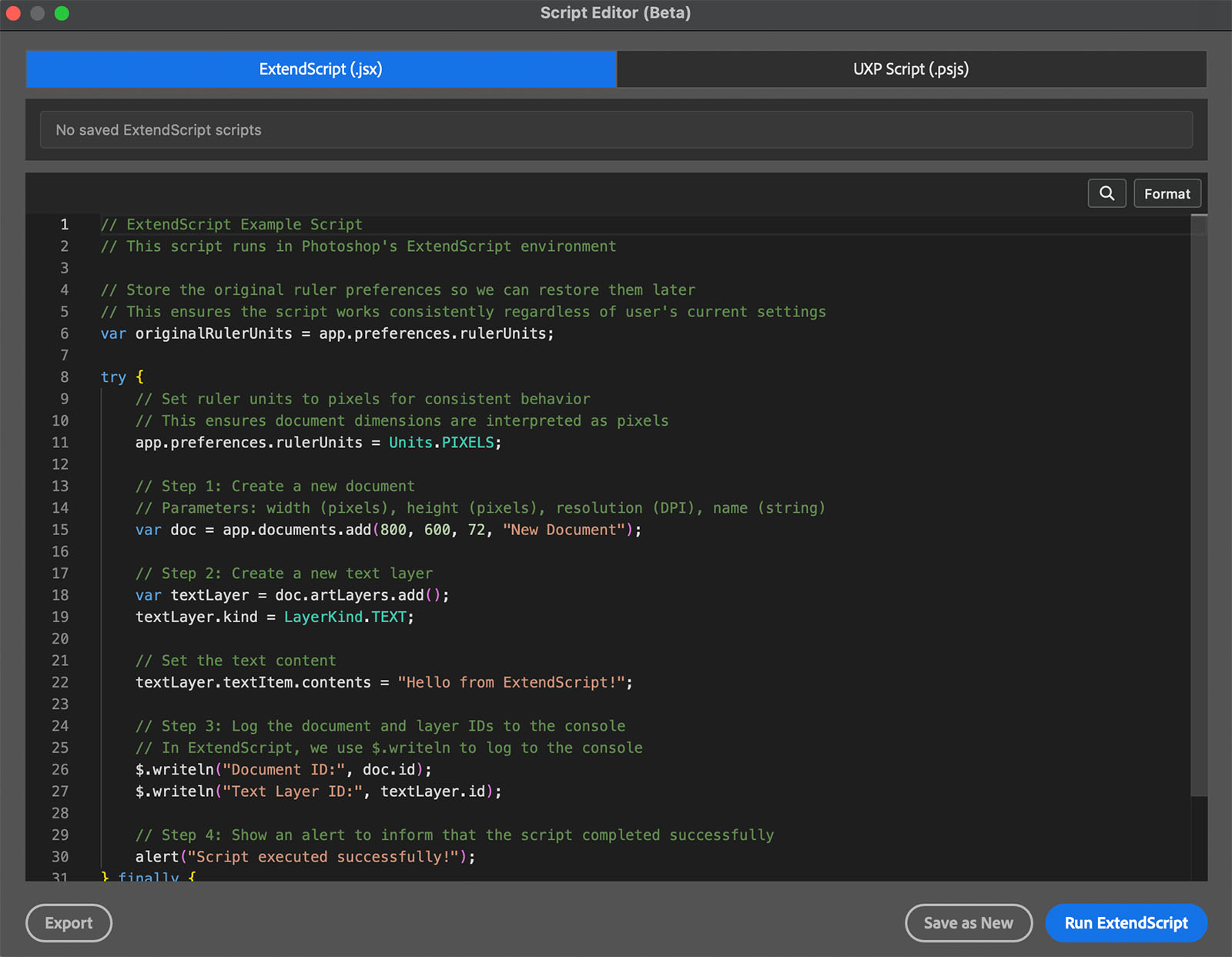
The Script Editor in the plugin lets you test and save automation without packaging a separate CEP or UXP plugin first.
If you mainly want custom Photoshop panels and faster everyday workflows, try Configurator Reloaded and skip the overhead of building your own panel stack.
Official and Further Reading
- UXP for CEP Developers (Adobe): why Adobe is moving from CEP to UXP
- CEP to UXP Technical Migration Guide (Adobe, GitHub): migration limits, Apple Silicon notes, file APIs, and plugin differences
- UXP Scripting (Adobe): how scripts differ from full plugins
- Why Migrating to Adobe UXP Now Is Critical (Andrew Zaikin, Medium): a practical migration-focused perspective
- Plugins on Macs with Apple silicon / CEP vs. UXP (Pixelsucht forum): community discussion around Mac compatibility